Software for service & repair companies

Renew more agreements.
Finish more jobs.

Max Work is software for service businesses. It tracks your service agreements and renewals, schedules your techs, and keeps every customer’s history in one place.

Explore solutions

White-label software. Your logo. Your colors.
Built around service and repair. Branded as your business.

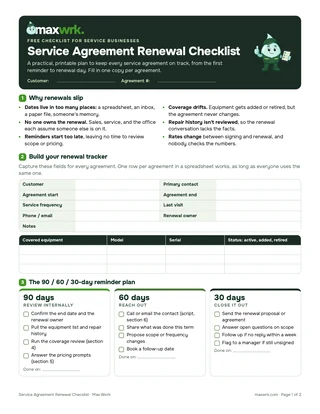
Never let a service agreement lapse again

Get the free Service Agreement Renewal Checklist for your business.

Get the free checklist
Page 1 preview of the Service Agreement Renewal Checklist
Service software

Every asset. Every job.
A clearer next step.

From the first customer call to the next renewal, keep the information your team needs with the work it supports.

Start with service operations. Add condition intelligence as your equipment data is ready.

maxwrk / Condition monitoringIllustrative workflow

From signal to service.

ASSET P-104Cooling water equipmentPlant 02 · Process water
Review due
Vibration trend mm/s RMSRising trend
Review marker · 3.5
Day 17-day exampleDay 7
Vibration4.2 mm/s
Bearing temp.68 °C
Operating hours2,840 h
01
Review the trend. Plan the inspection.

Compare operating conditions and history before scheduling bearing and alignment checks.

Equipment → Context → ActionExample data · Not live
Predictive maintenance + scheduling

See what needs attention.
Plan what happens next.

Use service history and available condition readings to understand which equipment needs attention. Connect the reviewed finding to an inspection, a parts plan, and a customer service window.

  • Review developing trends and available monitoring data
  • Prioritize inspections and service follow-up
  • Plan the technician, parts, and customer access window
  • Keep approved actions connected to the asset record

Condition-monitoring and analytical scope depend on your equipment, instrumentation, and data.

Explore solutions
Service from the field to the repair center

The right people.
The right parts.
A better prepared visit.

A technician should not have to call the office to reconstruct an asset’s history. Keep the model, previous repairs, approved scope, and parts requirements with the assignment—from a site visit to a rebuild.

  • Equipment model, serial number, and previous service findings
  • Technician skills, availability, and site requirements
  • Parts readiness and approved scope
  • Field notes, labor, materials, and closeout records
Explore solutions
Office · Repair center · Field

Plan

Covered equipment, upcoming visits, and renewal dates.

Coordinate

Technician assignment, parts readiness, and repair approvals.

Complete

Service report, recorded job costs, and the next customer action.

A connected business

From scattered records
to clear next steps.

Replace the handoffs that lose context with a record your whole team can follow.

When information is scattered

The team spends time
rebuilding the story.

  • Renewal dates buried in a spreadsheet or inbox
  • Technicians arriving without the equipment’s repair history
  • Quotes waiting on scattered parts and labor prices
  • Completed work waiting for billing details
With a connected workflow

The next decision
starts with context.

  • Agreements linked to covered equipment and upcoming visits
  • Equipment history carried into each assignment
  • Shared parts and labor rates tied to the approved scope
  • Labor, materials, and findings ready for billing review
See the workflow

The visit ends.
The history keeps working.

Follow a maintenance visit from the agreement to closeout, billing, and the next service commitment.

From agreement to completed service

One asset. One service record.

Sample asset · P-204
01

Prepare the visit

Link the covered equipment, service history, site contact, and agreed maintenance scope.

Agreement · Asset · Schedule
02

Complete the work

Assign the technician, check parts readiness, and record findings, photos, time, and materials.

Dispatch · Work order · Parts
03

Keep the next step visible

Prepare the billing record, assign recommended work, and review the next visit and renewal.

Job cost · Follow-up · Renewal

Illustrative service example · Sample data

Explore solutions
Start where it matters

A solution shaped
around your business.

Choose the right starting point for your team. We’ll walk through the workflows, data preparation, and support needed for your implementation.

Operations

Organize the daily service business

What we cover

  • Equipment identity and service records
  • Service agreements and visit scheduling
  • Dispatch, work orders, and repairs
  • Shared price book and job-cost records

Enterprise

Connect teams, sites, and systems

What we cover

  • Multi-site equipment and service workflows
  • ERP, CMMS, and monitoring integration assessment
  • Roles, approvals, and reporting configuration
  • Data migration, training, and phased rollout
Max, the maxwrk mascot

Tailored pricing. One clear scope.

Quoted for your team, equipment, workflows, and setup requirements. Your quote covers the agreed scope, setup work, and implementation timeline.

Service operations, explained

Your questions.
Clear answers.

Max, the maxwrk mascot

Get clear answers about setup, existing records, integrations, and pricing.

Talk about your operation
Can the software use our own branding?

Yes. maxwrk is white-label: your logo, your colors, and your business name. We configure the customer-facing experience under your brand and agree the branded screens and materials as part of setup.

Who is maxwrk built for?

maxwrk is built for businesses and service teams. It supports owners, service managers, dispatchers, repair coordinators and technicians managing work for their customers. Field service, repairs, maintenance agreements and customer equipment records are the focus.

Can we start with our existing spreadsheets and job records?

Yes. Existing customer lists, equipment registers, service history, and parts or labor rates are the starting point for the data review. We identify missing fields and duplicates, agree what to bring across, and define the cleanup and migration work in your implementation plan.

What does getting started involve?

We agree the first workflow, review your records, define the setup and any system connections, and plan training for the office and field team. The go-live timeline is agreed after the data and implementation requirements are understood.

Do we need sensors before we can get started?

No. Equipment records, service agreements, scheduling, repair workflows, and job costing do not depend on sensor data. Condition intelligence is a separate scope that requires suitable measurements, equipment context, and qualified review.

Can we keep our accounting or ERP system?

We begin by reviewing the systems you already use. Any connection or export process is assessed against available interfaces, permissions, and data quality. Compatibility and responsibility for each data flow are confirmed before implementation.

Does the workflow cover both the repair center and the field?

The solution covers both service processes: customer request, equipment intake or site visit, assessment, quotation, approval, parts preparation, repair, and closeout. We map the handoffs to your team’s roles and document what belongs in the first rollout.

How do we get pricing?

Call (855) 797-WORK / (855) 797-9675. We review your team size, equipment records, workflows, and setup requirements, then define a quote with a clear implementation scope and timeline. The packages are starting points for that conversation.


Service operations insights

A practical view of
the work behind uptime.

Call (855) 797-WORK / (855) 797-9675